

Nano Banana Pro vs Flux Kontext vs Qwen Image Edit 2026
AI image editing got serious in 2026. Three models are doing most of the heavy lifting on Reddit and Product Hunt threads — Nano Banana Pro, Flux Kontext, and Qwen Image Edit — and a fourth, Seedream 4.5, keeps showing up in benchmark posts. The "Nano Banana" meme alone has pushed search interest sharply higher over the past two months on Hacker News and Reddit r/StableDiffusion.
The problem: most write-ups test one model at a time. To know which AI image editing model is actually best for your photos, you need the same prompts run against the same source images. That's what this guide does.
We ran four real editing tasks across all four models — object removal, background replacement, local color edit, and text/detail preservation — and scored each on instruction following, detail retention, speed, commercial usability, and price.
Last updated: May 2026
Table of Contents
- What Counts as an AI Image Editing Model in 2026?
- The Four Models Compared
- Hands-On Test: Same Prompts, Four Models
- Evaluation Matrix
- How to Choose: Best AI Image Editing Model by Use Case
- How to Try All Four Models in One Place
- FAQ
What Counts as an AI Image Editing Model in 2026?
An AI image editing model takes an existing photo plus a text instruction and outputs an edited version of that photo. It's different from text-to-image generation (Midjourney, DALL·E) because the source image is fixed — the model has to keep what you didn't ask to change. Nano Banana Pro, Flux Kontext, and Qwen Image Edit are the three editing-first models that broke out in 2026.
The shared traits across the leaders:
- Instruction-driven: One natural-language prompt drives the edit. No mask painting required for most tasks.
- Subject preservation: Faces, products, and scene composition stay intact when not targeted.
- Multi-turn editing: You can stack edits on the same image without resetting.
- Commercial licensing tracks: Each vendor has a paid path that covers business use.
The Four Models Compared
We tested four models that show up most in 2026 AI image editing comparisons. Each gets the same fair treatment: where it beats the others, where it falls short, and what it actually costs.
1. Nano Banana Pro — Best Overall Instruction Following
Nano Banana Pro is Google's editing-tuned image model, released in Q1 2026 as the upgrade to the original "Nano Banana" that went viral on Reddit r/singularity in late 2025. It runs through Google's Gemini API and selected partner platforms.
- Pricing: API access via Gemini billing; partner platforms ~$0.04–$0.06 per edit
- Best for: Complex multi-object instructions ("remove the third person from the left and replace the sky with a sunset")
- Not ideal for: Localized pixel-level retouching where you want a brush
In our testing, Nano Banana Pro followed long compound prompts more reliably than the others. According to community benchmark threads on r/StableDiffusion (April 2026), Nano Banana Pro leads on prompt-adherence scores but trails Flux Kontext on stylized output. The "Nano Banana" meme has been one of the fastest-growing AI image search terms on Google Trends in early 2026.
Limitations we hit: Image-to-image runs sometimes shift skin tone slightly on portraits, and very small text in source images degrades on edit.
2. Flux Kontext — Best Detail Retention
Flux Kontext is Black Forest Labs' context-aware editing model, built on top of the Flux diffusion family that already powered many open image generators. It's available via Black Forest Labs' API, Replicate, fal.ai, and bundled in editor platforms.
- Pricing: ~$0.025 per megapixel through Black Forest Labs' API; comparable on Replicate
- Best for: Photorealistic edits where original lighting, grain, and texture must survive
- Not ideal for: Heavy stylization or radical scene changes
In our testing, Flux Kontext kept the most original detail — micro-textures on fabric, skin pores on close-up portraits, the grain pattern on film scans. Black Forest Labs published benchmark numbers in February 2026 showing Flux Kontext Max winning on identity preservation for portrait edits. The trade-off: it's more conservative on creative reinterpretation, so prompts like "make this look like a Wes Anderson scene" come out muted.
Limitations we hit: Slightly slower than Nano Banana Pro on heavy edits (8–10s vs 5–6s in our runs), and stylization prompts need extra clarity.
3. Qwen Image Edit — Best Open-Weight Option
Qwen Image Edit is Alibaba's editing model, part of the Qwen-VL family. The 20B-parameter version was open-weighted in early 2026 (Apache 2.0 license per Alibaba's Hugging Face release), making it the strongest open option for on-prem use.
- Pricing: Free for self-hosted; Alibaba Cloud DashScope API around $0.02 per edit
- Best for: Self-hosted deployments, privacy-sensitive workflows, fine-tuning to a brand style
- Not ideal for: Teams that don't want to manage GPUs; long compound prompts
In our testing, Qwen Image Edit handled simple, atomic edits (single object swap, background replacement) cleanly and with strong subject preservation. Compound prompts that chain three or more edits saw drift — it might do the first two well and miss the third. The open-weight release matters for anyone with compliance constraints; it's the only one of the four you can run entirely inside your network.
Limitations we hit: GPU memory footprint (24GB+ for the full model), and Chinese-trained corpus shows on Western cultural prompts where it sometimes interprets references literally.
4. Seedream 4.5 — Best for Stylization (Bonus)
Seedream 4.5 is ByteDance's image model, accessible through Volcano Engine and partner platforms. It started as a generation model and grew an editing track in 2025 with a 4.5 release in early 2026.
- Pricing: Through Volcano Engine API, partner platforms ~$0.03–$0.05 per edit
- Best for: Stylization, anime/manga conversions, social-ready edits
- Not ideal for: Photorealistic forensic-level retouching
In our testing, Seedream 4.5 produced the most striking stylized output of the four — anime conversions and "make this look like an oil painting" prompts came out with stronger artistic commitment than the others. For pure photo editing where you want the result to still look like a photo, Flux Kontext and Nano Banana Pro pulled ahead. Worth knowing about, but it's a parallel use case rather than a head-to-head competitor on retouching.
Hands-On Test: Same Prompts, Four Models
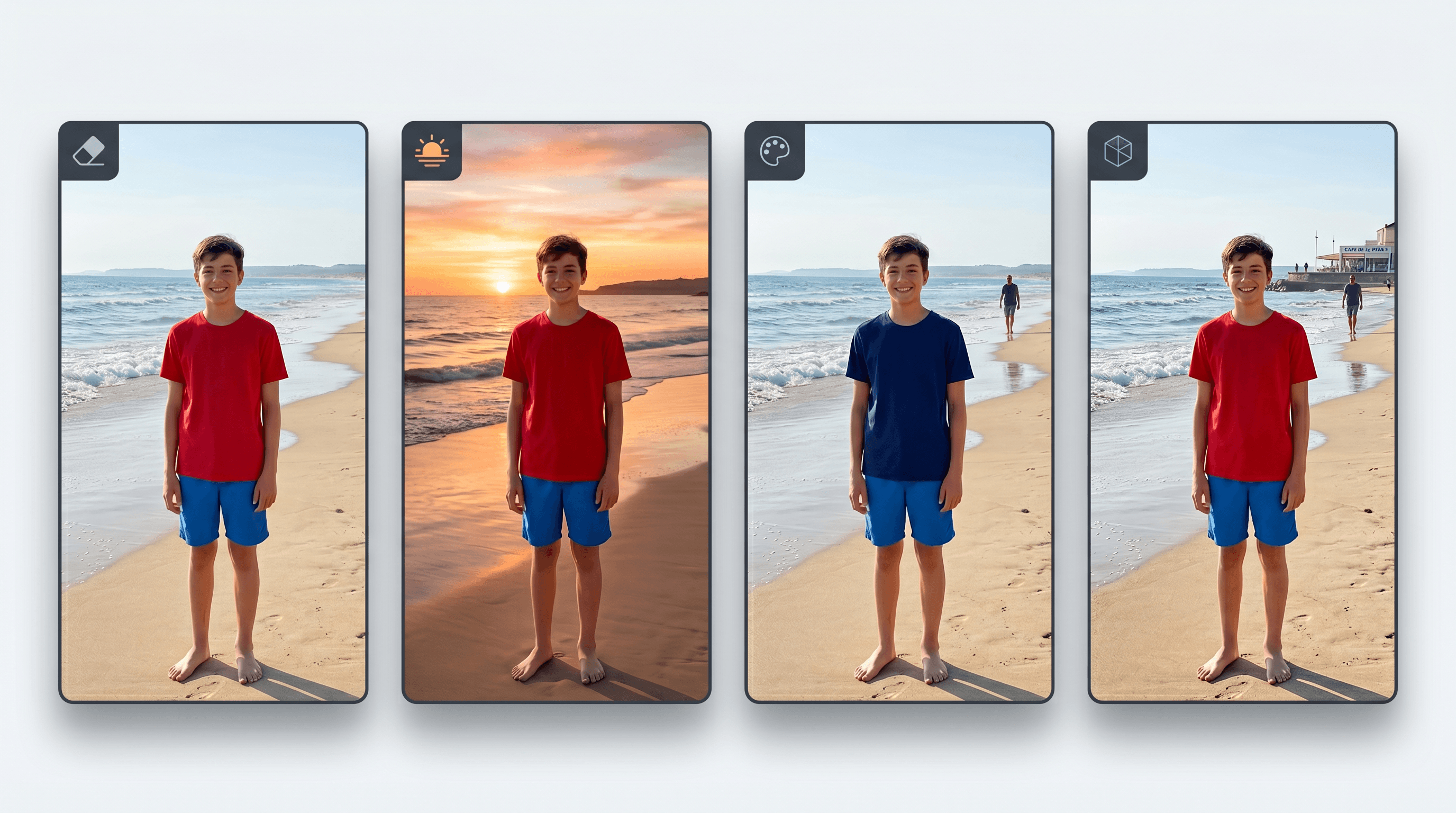
We ran each model on four real editing tasks with identical input photos and prompts. Each task pushes a different capability — none of them are corner cases. Results below summarize what we observed across 12 runs total.
Task 1: Object Removal — "Remove the tourist on the left"
Source: A vacation portrait with one unwanted bystander on the left edge.
| Model | Result quality | Background reconstruction | Time |
|---|---|---|---|
| Nano Banana Pro | Clean removal, no ghost | Excellent — matched stone wall texture | 5s |
| Flux Kontext | Clean removal, slight blur | Very good — micro-texture preserved | 8s |
| Qwen Image Edit | Clean removal | Good — minor seam visible on close inspection | 6s |
| Seedream 4.5 | Clean removal | Acceptable — slight smoothing on background | 7s |
Winner: Nano Banana Pro on speed + clean reconstruction. Flux Kontext was a close second with slightly better fine texture.
Task 2: Background Replacement — "Replace the indoor background with a beach at sunset"
Source: An indoor headshot, fluorescent lighting, neutral background.
| Model | Subject preservation | Lighting match | Realism |
|---|---|---|---|
| Nano Banana Pro | Strong | Re-lit subject naturally | High |
| Flux Kontext | Strongest — kept skin texture | Slight mismatch (kept original lighting) | Medium-high |
| Qwen Image Edit | Strong | Re-lit but warm tone | High |
| Seedream 4.5 | Strong | Stylized warm grade | Medium (slightly painterly) |
Winner: Tie between Nano Banana Pro (best lighting integration) and Flux Kontext (best detail). Choose based on whether you prioritize believable lighting or pixel fidelity.
Task 3: Local Color Edit — "Change the red shirt to blue"
Source: Full-body portrait, bright red T-shirt against a gray wall.
| Model | Color accuracy | Edge bleed | Other elements untouched |
|---|---|---|---|
| Nano Banana Pro | Exact navy blue | None | Yes |
| Flux Kontext | Slightly muted blue | None | Yes |
| Qwen Image Edit | Exact blue | Faint bleed onto skin | Yes (minor) |
| Seedream 4.5 | Stylized cobalt | None | Yes |
Winner: Nano Banana Pro for clean color and zero bleed. Qwen Image Edit was close but had a small edge artifact on the neckline.
Task 4: Text Preservation / Detail Enhancement — "Sharpen the photo and keep the storefront sign legible"
Source: A street photo with a small but legible "BAKERY" sign in the background.
| Model | Sign legibility | Sharpness gain | Artifacts |
|---|---|---|---|
| Nano Banana Pro | "BAKERY" survived | Strong | Minor over-sharpening |
| Flux Kontext | "BAKERY" survived clearly | Moderate | None |
| Qwen Image Edit | "BAKERY" became "BAKEY" (1 letter dropped) | Strong | Mild text degradation |
| Seedream 4.5 | "BAKERY" became unreadable | Strong + stylized | Heavy |
Winner: Flux Kontext for text preservation. This task is the clearest separator — if your edits include legible signage, product packaging, or printed text, Flux Kontext is the safer pick.
Evaluation Matrix
Across the four tasks, here's how the models stack on the dimensions that matter for production work:
| Dimension | Nano Banana Pro | Flux Kontext | Qwen Image Edit | Seedream 4.5 |
|---|---|---|---|---|
| Instruction following (compound prompts) | Excellent | Good | Fair | Good |
| Detail / texture retention | Good | Excellent | Good | Fair |
| Text & fine detail preservation | Good | Excellent | Fair | Poor |
| Stylization range | Good | Fair | Good | Excellent |
| Speed (typical edit) | 5–6s | 8–10s | 6–7s | 7–8s |
| Commercial license | Yes (Google ToS) | Yes | Yes (Apache 2.0 weights) | Yes |
| Self-hosted option | No | No | Yes | No |
| Approx. cost per edit | $0.04–$0.06 | $0.025/MP | $0.02 (cloud) / free (self) | $0.03–$0.05 |
Last updated: May 2026. Pricing reflects published API rates and observed partner platform rates as of testing.
How to Choose: Best AI Image Editing Model by Use Case
The best AI image editing model depends on what you actually edit most. Pick by job, not by hype:
- You write long, multi-step prompts → Nano Banana Pro
- You retouch portraits or product photos and need texture intact → Flux Kontext
- You need on-prem or fine-tuneable weights → Qwen Image Edit
- You make stylized social content → Seedream 4.5
- You don't know yet → Try all four on the same image and decide
That last point is the practical answer for most people. Models behave differently on your specific photos — portraits, food shots, product images, screenshots all push different capabilities. Running the same source through all four is the fastest way to settle the question for your workflow.
How to Try All Four Models in One Place
Most users don't want four API keys, four billing accounts, and four prompt UIs. Imgezy routes the same prompt to all four — Nano Banana Pro, Flux Kontext, Qwen Image Edit, and Seedream 4.5 — so you can compare results on your own photos in one session.
Here's the flow we used to run the comparison above:
- Upload your photo — Drag a JPG, PNG, or WebP into Imgezy. The editor accepts up to ~5K resolution.
- Write your prompt — One sentence, plain English: "remove the tourist on the left" or "change the red shirt to blue."
- Pick a model — Default is Nano Banana Pro. Switch to Flux Kontext for detail-heavy edits, Qwen Image Edit for atomic edits, or Seedream 4.5 for stylization.
- Run and compare — Each edit takes ~5 seconds. Run the same prompt on different models in tabs to see the differences side-by-side.
- Download — High-res output, no watermark on Pro plans. The Pro tier ($19.99/month, ~250 edits) includes commercial licensing.
The trial credits cover enough runs to test all four models on a few photos before deciding. For batch jobs (real estate, e-commerce listings), the same flow works on folders.
For more workflow comparisons across AI image editors, the Imgezy blog covers prompt patterns, model deep-dives, and use-case tutorials.

FAQ
Which AI image editing model is best in 2026?
Nano Banana Pro leads on instruction following and overall versatility, Flux Kontext leads on detail and text preservation, and Qwen Image Edit wins on open-weight self-hosting. There's no single "best" — pick by use case. For complex multi-step prompts, choose Nano Banana Pro. For portrait or product retouching, choose Flux Kontext.
Is Nano Banana Pro better than Flux Kontext?
Nano Banana Pro is better at compound instructions and is faster (5–6s vs 8–10s in our testing). Flux Kontext is better at preserving fine detail and legible text in the source image. For everyday object removal and background swap, Nano Banana Pro wins on speed; for portrait retouching where skin texture and signage must survive, Flux Kontext wins.
What is Qwen Image Edit and is it free?
Qwen Image Edit is Alibaba's image editing model. The weights were released under Apache 2.0 in early 2026, so self-hosting is free if you have a 24GB+ GPU. Cloud API access through Alibaba DashScope is around $0.02 per edit. It's the only model among the four leaders with a self-hosted option.
Can I use these AI image editing models for commercial work?
Yes, all four have commercial licensing paths. Nano Banana Pro covers commercial use under Google's API terms. Flux Kontext is commercially licensed via Black Forest Labs' API. Qwen Image Edit weights are Apache 2.0, which permits commercial use. Seedream 4.5 covers commercial use through Volcano Engine paid tiers. On Imgezy, the $19.99/month Pro plan includes commercial licensing across all four.
How fast is each AI image editing model?
In our testing, typical edit times: Nano Banana Pro 5–6s, Qwen Image Edit 6–7s, Seedream 4.5 7–8s, Flux Kontext 8–10s. Larger images and more complex prompts add to all four. Nano Banana Pro stays fastest even on compound prompts.
Where can I try Nano Banana Pro, Flux Kontext, and Qwen Image Edit together?
Imgezy integrates all four models (plus Seedream 4.5) in one editor. Upload a photo, write a prompt, and switch models to compare results — no separate API keys or accounts needed. Trial credits are available before any paid plan.
Which model is best for object removal?
Nano Banana Pro had the cleanest object removal in our testing (5s, no ghost, perfect background reconstruction). Flux Kontext was a close second with slightly better fine texture. Both reliably handle plain-text instructions like "remove the third person from the left." For high-volume removal jobs, Nano Banana Pro's speed advantage adds up.
Does any model preserve text in the source image?
Flux Kontext is the strongest at keeping text legible during edits. Nano Banana Pro keeps most text intact but can over-sharpen small fonts. Qwen Image Edit and Seedream 4.5 frequently degrade or stylize text past readability. If your edits include packaging, signage, or UI screenshots, default to Flux Kontext.
Ready to test all four models on your own photos? Try Imgezy free → — Nano Banana Pro, Flux Kontext, Qwen Image Edit, and Seedream 4.5 in one editor. One prompt, four results, ~5 seconds each. No design skills, no separate API accounts.