

Best Free Adobe Photoshop Alternatives for 2026
Adobe just got caught modifying users' hosts files without permission — a move that sparked mass outrage on Hacker News (233 upvotes, 107 comments). For many photographers and designers, this was the final straw after years of forced subscriptions, cloud-dependent workflows, and aggressive tracking.
You don't need Photoshop anymore. AI-powered photo editors now handle object removal, background replacement, and photo enhancement — tasks that used to require hours of manual clone-stamping. Several of these tools are free or cost a fraction of Photoshop's $22.99/month.
We tested 6 of the best free Adobe Photoshop alternatives to find which ones actually deliver. Here's what we found.
Table of Contents
- What Makes a Good Photoshop Alternative?
- 6 Best Free Photoshop Alternatives Compared
- Feature Comparison Table
- How to Choose the Right Alternative
- How to Remove Objects from Photos Without Photoshop
- FAQ
What Makes a Good Photoshop Alternative?
A strong Adobe Photoshop alternative free tool should handle core photo editing tasks — object removal, background replacement, color correction, and batch processing — without a steep learning curve or expensive subscription. The best alternatives in 2026 use AI to automate what used to require manual effort in Photoshop.
Key evaluation criteria:
- AI-powered editing: Automatic object removal, background replacement, and enhancement without manual selection tools
- No installation required: Browser-based tools that work on any device, any OS
- Affordable or free: Free tiers or low-cost plans vs. Photoshop's $22.99/month Creative Cloud subscription
- Output quality: Results comparable to careful manual Photoshop work
- Privacy respect: No unauthorized system modifications or aggressive tracking — a growing concern after Adobe's hosts file incident
According to a 2025 Creative Software Market Report by Grand View Research, the online photo editing tools market reached $1.2 billion, growing at 9.3% annually as users shift from desktop software to browser-based AI editors.
6 Best Free Photoshop Alternatives Compared
1. GIMP — Best for Power Users Who Want Full Control
Pricing: Completely free and open source Platform: Windows, macOS, Linux (desktop only)
GIMP (GNU Image Manipulation Program) is the most established free Photoshop alternative, with over 20 years of development. It offers layers, masks, customizable filters, and advanced selection tools. In our testing, GIMP handled about 90% of Photoshop's core functionality — including channel operations, path editing, and batch scripting via Script-Fu.
Best for: Experienced editors comfortable with a learning curve who want maximum control at zero cost. Linux users who can't run Photoshop natively.
Not ideal for: Quick edits or users who want AI automation. GIMP has no built-in AI for object removal or background replacement — every edit is manual.
2. Photopea — Best Browser-Based Photoshop Clone
Pricing: Free with ads, Premium at $5/month (ad-free) Platform: Browser-based (works everywhere)
Photopea replicates Photoshop's interface almost exactly — including full PSD, XCF, Sketch, and RAW file support. It runs entirely in your browser with zero installation. We found it handled complex layer operations, blend modes, and even Photoshop Actions files.
Best for: Photoshop users who want a familiar interface without the subscription. The PSD compatibility alone makes it essential for collaborative workflows.
Not ideal for: AI-powered editing. Photopea is a manual editor with no AI object removal or one-click background replacement. Processing large files (100MB+) can be slow in-browser.
3. Pixlr — Best Free AI Photo Editor for Quick Edits
Pricing: Free tier (limited), Plus at $7.99/month, Premium at $12.99/month Platform: Browser-based
Pixlr offers AI background removal and basic photo enhancement in its free tier. The interface is clean and beginner-friendly, with separate apps for quick edits (Pixlr Express) and advanced editing (Pixlr Editor). In our testing, AI background removal worked well for clean-edge subjects but struggled with complex edges like hair or transparent objects.
Best for: Quick social media edits and basic AI-powered background removal. The dual-app approach lets beginners start simple.
Not ideal for: Professional-grade object removal, batch processing, or detailed retouching. Free tier limits AI features to a few uses per day.
4. Canva — Best for Non-Designers Who Need Templates
Pricing: Free tier, Pro at $12.99/month Platform: Browser-based, iOS, Android
Canva is primarily a design tool, but its photo editing features — including Magic Eraser (AI object removal) and Background Remover — make it a viable Adobe alternative 2026 for basic editing. With over 190 million monthly active users (Canva 2025 Annual Report), it's the most widely used tool on this list.
Best for: Social media creators and marketers who need design templates alongside basic photo editing. The template library is unmatched.
Not ideal for: Detailed photo manipulation or professional retouching. Canva's editing tools are intentionally simplified — no layers, no precise selection tools, no RAW support.
5. Fotor — Best for One-Click Photo Enhancement
Pricing: Free tier, Pro at $8.99/month Platform: Browser-based, iOS, Android
Fotor focuses on AI photo enhancement and batch processing. Its one-click enhance uses AI to adjust lighting, color balance, sharpness, and noise reduction simultaneously. In our testing, enhancement results were consistent across portrait, landscape, and product photography.
Best for: Photographers who need fast, consistent enhancement across many photos. Real estate and e-commerce product photographers benefit most from batch processing.
Not ideal for: Complex editing like precise object removal or compositing. AI removal features require the paid tier, and results are moderate compared to specialized tools.
6. Imgezy — Best for AI Object Removal and Background Replacement
Pricing: Free trial credits, Basic at $9.99/month (80 credits ≈ 40 edits), Pro at $19.99/month (500 credits ≈ 250 edits) Platform: Browser-based
Imgezy specializes in AI-powered photo editing with a text-based interface — describe what you want to change in plain English, and the AI handles the rest. In our testing, object removal completed in about 5 seconds with clean reconstruction of the background area. The platform runs multiple AI models including Nano Banana Pro and Flux Kontext, automatically selecting the best model for each task.
Over 200K users have processed 1M+ object removals on the platform, with an average processing time of 5 seconds per edit.
Best for: Users who want fast AI-driven editing without learning complex tools. Particularly strong for object removal, background replacement, and photo enhancement — the three tasks that drive most Photoshop usage.
Not ideal for: Manual pixel-level editing or traditional layer-based compositing. Imgezy is AI-first — you describe changes in text rather than using selection tools.
Feature Comparison Table
This table compares all 6 Adobe Photoshop alternatives across the features that matter most for photo editing in 2026:
| Feature | GIMP | Photopea | Pixlr | Canva | Fotor | Imgezy |
|---|---|---|---|---|---|---|
| Price (Free/Paid) | Free | Free / $5/mo | Free / $7.99/mo | Free / $12.99/mo | Free / $8.99/mo | Trial / $9.99/mo |
| AI Object Removal | No | No | Basic | Basic | Paid only | Advanced |
| AI Background Swap | No | No | Yes | Yes | Paid only | Yes (text-based) |
| Photo Enhancement | Manual | Manual | Yes | Limited | Yes (best) | Yes (AI auto) |
| Batch Processing | Via scripts | No | No | No | Yes | Yes |
| PSD File Support | Yes | Yes (best) | Limited | No | No | No |
| Layer Editing | Full | Full | Yes | Limited | No | No |
| Browser-Based | No | Yes | Yes | Yes | Yes | Yes |
| Avg. Edit Speed | Varies | Fast | Fast | Fast | Fast | ~5 sec |
| Open Source | Yes | No | No | No | No | No |
| Commercial License | Yes (free) | Yes (paid) | Yes (paid) | Yes (paid) | Yes (paid) | Yes ($19.99/mo) |
Last updated: April 2026
How to Choose the Right Alternative
The right Adobe Photoshop alternative depends on what you actually do most. Here's a decision guide by use case:
You need full manual control → GIMP. It's the closest to Photoshop in functionality, completely free, and runs on Linux. The 2-3 week learning curve pays off if you edit daily.
You work with PSD files → Photopea. Nothing else matches its PSD compatibility in the browser. Zero installation, works on any device.
You need quick AI edits → Pixlr. Clean interface, decent AI features for social media content. Best for occasional editors who want simplicity.
You design + edit → Canva. If you spend more time making social posts than retouching photos, Canva's template ecosystem makes it the practical choice.
You process photos in bulk → Fotor. One-click enhancement across hundreds of photos saves hours. Best for product photography and real estate.
You need fast AI object removal → Imgezy. Upload, describe, download. Removes objects and swaps backgrounds in 5 seconds without learning complex tools.
How to Remove Objects from Photos Without Photoshop
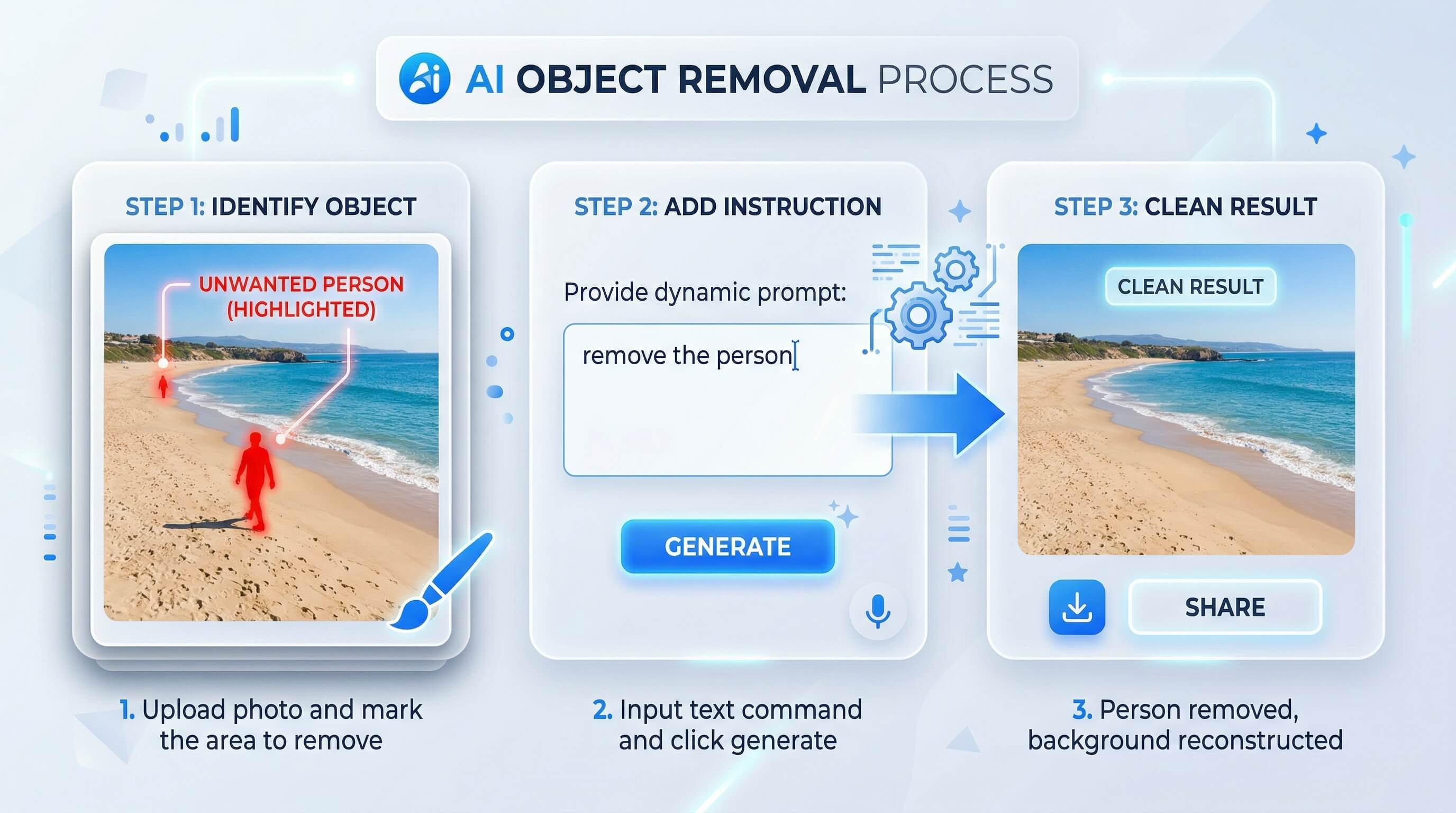
Object removal is the #1 reason people pay for Photoshop. Here's how to do it with an AI photo editor online — no installation, no subscription commitment:
Step 1: Upload your photo Go to Imgezy and drag your image onto the editor. Supports JPG, PNG, and WebP up to 20MB.
Step 2: Describe what to remove Type a natural-language instruction: "remove the person on the left," "erase the power lines," or "delete the trash can in the background." No need to manually paint over objects with a brush tool.
Step 3: Review and download The AI processes your request in about 5 seconds, intelligently reconstructing the background area. Preview the result, then download the high-resolution output.
This replaces what typically takes 15-30 minutes of clone stamping and content-aware fill in Photoshop. For batch needs, you can process multiple images sequentially without re-uploading.
FAQ
Is there a truly free alternative to Adobe Photoshop?
Yes. GIMP is 100% free, open-source, and offers layers, masks, filters, and most of Photoshop's core editing features. Photopea is free in the browser with ads. Most AI photo editors including Pixlr and Imgezy offer free tiers with limited credits per day.
Can AI photo editors actually replace Photoshop for professional work?
For specific tasks — yes. AI editors handle object removal, background replacement, and photo enhancement faster than manual Photoshop work. A removal that takes 20 minutes in Photoshop takes 5 seconds in an AI editor. For complex compositing, digital painting, or print-production color management, traditional editors like GIMP or Photopea remain better suited.
What happened with Adobe modifying users' hosts files?
In early 2026, users discovered Adobe Creative Cloud software was silently modifying system hosts files — the file that maps domain names to IP addresses — without user consent. The discovery sparked significant backlash on Hacker News (233 upvotes, 107 comments), with users expressing deep concern about desktop software making unauthorized system-level changes. This incident reinforced growing frustration with Adobe's subscription model, mandatory cloud connectivity, and data collection practices.
Which free Photoshop alternative is best for removing objects from photos?
For AI-powered object removal specifically, Imgezy and Pixlr offer the strongest results among free-tier options. Imgezy processes removals in ~5 seconds using text instructions ("remove the person on the left"), while Pixlr uses brush-based selection. GIMP can remove objects manually using clone stamp and healing tools but requires significantly more time and skill.
Are browser-based AI photo editors safe for personal photos?
Reputable AI photo editors process images on encrypted servers and delete uploads after processing (check each tool's privacy policy for specifics). Browser-based tools have a structural safety advantage: they don't install software on your system, can't modify system files, and can't run background processes — unlike desktop applications such as Adobe Creative Cloud.
How much does Photoshop cost vs. free alternatives?
Adobe Photoshop requires a Creative Cloud subscription at $22.99/month ($275.88/year). GIMP and Photopea are free. AI editors like Imgezy ($9.99/month), Fotor ($8.99/month), and Pixlr ($7.99/month) cost 56-65% less than Photoshop while automating the most common editing tasks with AI.
Ready to edit photos without Photoshop — and without software that modifies your system files? Try Imgezy free → — remove objects, swap backgrounds, and enhance photos with AI. No installation, no subscription lock-in, no unauthorized system changes.